Understanding Kotlin Coroutines Flow Internals: Buffering and Conflation
Japanese version: This article is also available in Japanese on Zenn.
I have been decoding the internal implementation of Kotlin Coroutines Flow from its source code, aiming to demystify Flow for developers who use it as a black box.
In previous articles, I covered Flow Builders like flow, Terminal Operators like collect, and Intermediate Operators like map, filter, and flowOn — all from their internal implementations. This article builds on the knowledge from those articles, so if you haven’t read them yet, I recommend starting there.
- Understanding Kotlin Coroutines Flow Internals: Flow Builder, emit, and collect
- Understanding Kotlin Coroutines Flow Internals: How map and filter Work
- Understanding Kotlin Coroutines Flow Internals: How flowOn Switches Execution Contexts
This article covers Buffering and Conflation. After reviewing their surface-level usage, I will reveal the internal implementation of each. While Buffering and Conflation may not be used frequently, understanding them from the inside will help you use them with confidence when the need arises.
Note: The version of
kotlinx.coroutines1 used in this article is v1.10.2, the latest version at the time of writing.
Review of Buffering Specs
Let’s recap the surface-level specs of Buffering in Flow from the official documentation2.
In the following code, the flow waits 100ms before each emit, and collect also waits 300ms before printing each value. As a result, it takes 1200ms (400ms × 3) to print all values.
fun simple(): Flow<Int> = flow {
    for (i in 1..3) {
        delay(100) // pretend we are asynchronously waiting 100 ms
        emit(i) // emit next value
    }
}

fun main() = runBlocking<Unit> {
    val time = measureTimeMillis {
        simple().collect { value ->
            delay(300) // pretend we are processing it for 300 ms
            println(value)
        }
    }
    println("Collected in $time ms")
}Output:
1
2
3
Collected in 1220 ms
This behavior can be explained from what we learned in the first article. When emit is called inside flow, the lambda passed to collect is called.
In other words, the above code is equivalent to the following. This makes the reason for the 1200ms delay clear.
fun simple(): Flow<Int> = flow {
    for (i in 1..3) {
        delay(100) // pretend we are asynchronously waiting 100 ms
        // emit(i) 👇 Equivalent to the following
        delay(300)
        println(i)
    }
}
Alternatively, as covered in the previous article, using flowOn(Dispatchers.IO) to run the flow processing on a background thread reduces the total execution time to around 1000ms.
fun main() = runBlocking<Unit> {
    val time = measureTimeMillis {
        simple()
            .flowOn(Dispatchers.IO)
            .collect { value ->
                delay(300) // pretend we are processing it for 300 ms
                println(value)
            }
    }
    println("Collected in $time ms")
}Output:
1
2
3
Collected in 1057 ms
This behavior can also be explained from what we learned in the previous article. When emit is called inside flow, instead of synchronously calling the lambda passed to collect, the value is sent to a Channel. The 300ms wait in the collector runs asynchronously on the main thread, resulting in a total execution time of about 1000ms (100ms + 300ms × 3).
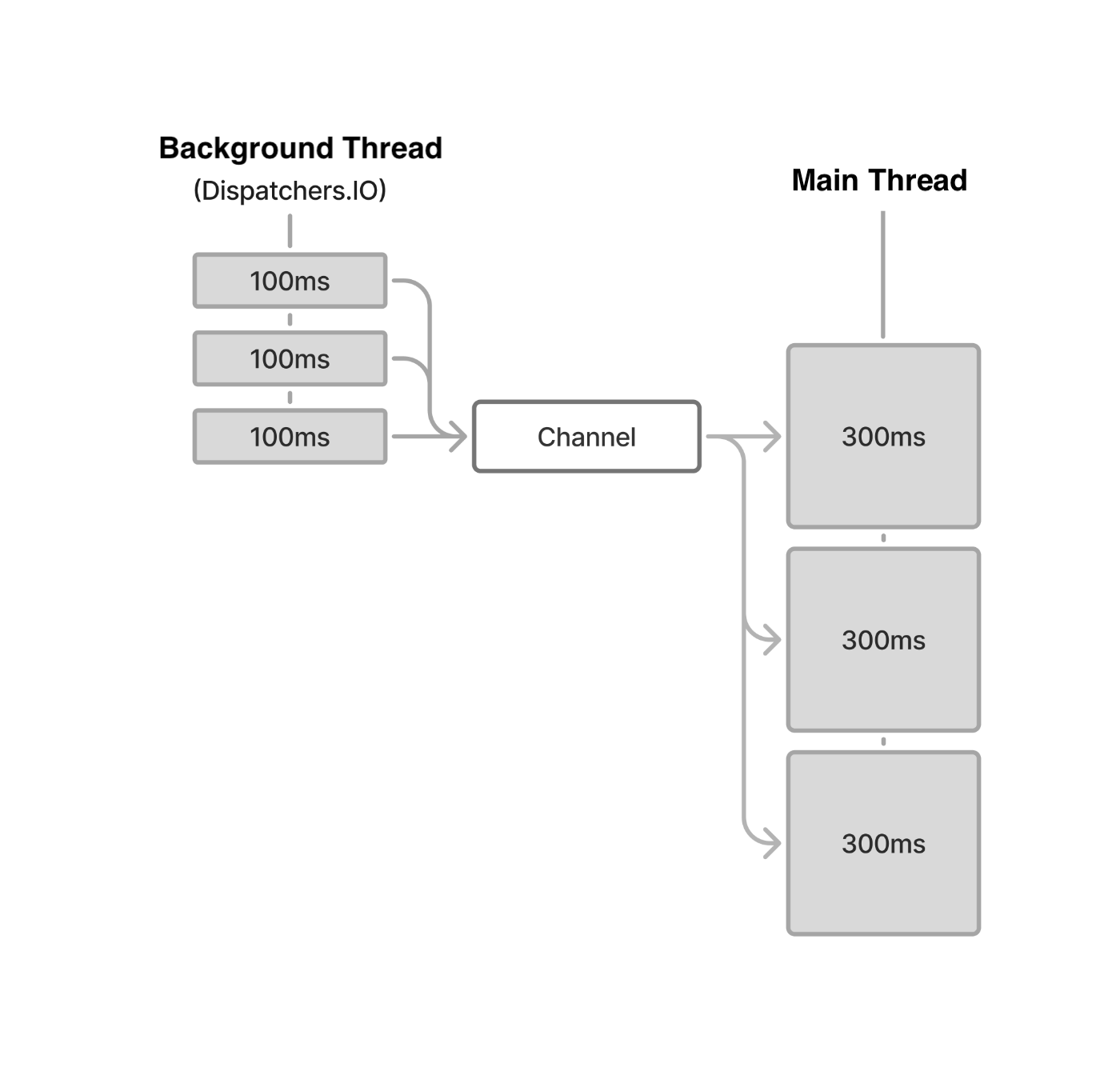 Execution flow when
 flowOn(Dispatchers.IO) is present
Another approach — and the focus of this article — is the buffer Intermediate Operator. Using buffer allows the values from simple() to be emitted concurrently with the delay(300) in the collect side, without switching the execution context.
fun main() = runBlocking<Unit> {
    val time = measureTimeMillis {
        simple()
            .buffer() // buffer emissions, don't wait
            .collect { value ->
                delay(300) // pretend we are processing it for 300 ms
                println(value)
            }
    }
    println("Collected in $time ms")
}Output:
1
2
3
Collected in 1057 ms
Internal Implementation of buffer
Let’s uncover how the behavior of buffer described above is implemented internally.
public fun <T> Flow<T>.buffer(capacity: Int = BUFFERED, onBufferOverflow: BufferOverflow = BufferOverflow.SUSPEND): Flow<T> {
    require(capacity >= 0 || capacity == BUFFERED || capacity == CONFLATED) {
        "Buffer size should be non-negative, BUFFERED, or CONFLATED, but was $capacity"
    }
    require(capacity != CONFLATED || onBufferOverflow == BufferOverflow.SUSPEND) {
        "CONFLATED capacity cannot be used with non-default onBufferOverflow"
    }
    // desugar CONFLATED capacity to (0, DROP_OLDEST)
    var capacity = capacity
    var onBufferOverflow = onBufferOverflow
    if (capacity == CONFLATED) {
        capacity = 0
        onBufferOverflow = BufferOverflow.DROP_OLDEST
    }
    // create a flow
    return when (this) {
        is FusibleFlow -> fuse(capacity = capacity, onBufferOverflow = onBufferOverflow)
        else -> ChannelFlowOperatorImpl(this, capacity = capacity, onBufferOverflow = onBufferOverflow)
    }
}The key part to focus on is the return of ChannelFlowOperatorImpl at the end. ChannelFlowOperatorImpl also appeared in the previous article. Let’s revisit it as a review.
ChannelFlowOperatorImpl has the following inheritance hierarchy and is a type of Flow. In other words, buffer, like the Intermediate Operators seen in previous articles, creates and returns a new Flow.
Flow<T>  (interface)
└── FusibleFlow<T>  (interface, ChannelFlow.kt)
    └── ChannelFlow<T>  (abstract class, ChannelFlow.kt)
        └── ChannelFlowOperator<S, T>  (abstract class)
                └── ChannelFlowOperatorImpl<T>  (class)
Let’s look at FusibleFlow and ChannelFlow. First, FusibleFlow — as the name “Fusible” suggests — is an interface for optimization: when buffer or flowOn is applied to a FusibleFlow, instead of creating a new FusibleFlow, it fuses them into a single FusibleFlow.
public interface FusibleFlow<T> : Flow<T> {
    /**
     * This function is called by [flowOn] (with context) and [buffer] (with capacity) operators
     * that are applied to this flow. Should not be used with [capacity] of [Channel.CONFLATED]
     * (it shall be desugared to `capacity = 0, onBufferOverflow = DROP_OLDEST`).
     */
    public fun fuse(
        context: CoroutineContext = EmptyCoroutineContext,
        capacity: Int = Channel.OPTIONAL_CHANNEL,
        onBufferOverflow: BufferOverflow = BufferOverflow.SUSPEND
    ): Flow<T>
}Next, ChannelFlow. The following is an excerpt of the important parts from ChannelFlow’s source code.
public abstract class ChannelFlow<T>(
    // upstream context
    @JvmField public val context: CoroutineContext,
    // buffer capacity between upstream and downstream context
    @JvmField public val capacity: Int,
    // buffer overflow strategy
    @JvmField public val onBufferOverflow: BufferOverflow
) : FusibleFlow<T> {
    public open fun produceImpl(scope: CoroutineScope): ReceiveChannel<T> =
        scope.produce(context, produceCapacity, onBufferOverflow, start = CoroutineStart.ATOMIC, block = collectToFun)

    override suspend fun collect(collector: FlowCollector<T>): Unit =
        coroutineScope {
            collector.emitAll(produceImpl(this))
        }
}In produceImpl, a new coroutine is launched that calls collect on the upstream Flow, and a Channel for receiving values emitted from upstream is created. The received values are then passed downstream via FlowCollector’s emitAll.
The Channel is created with the produce method, an extension function on CoroutineScope.
internal fun <E> CoroutineScope.produce(
    context: CoroutineContext = EmptyCoroutineContext,
    capacity: Int = 0,
    onBufferOverflow: BufferOverflow = BufferOverflow.SUSPEND,
    start: CoroutineStart = CoroutineStart.DEFAULT,
    onCompletion: CompletionHandler? = null,
    @BuilderInference block: suspend ProducerScope<E>.() -> Unit
): ReceiveChannel<E> {
    val channel = Channel<E>(capacity, onBufferOverflow)
    val newContext = newCoroutineContext(context)
    val coroutine = ProducerCoroutine(newContext, channel)
    if (onCompletion != null) coroutine.invokeOnCompletion(handler = onCompletion)
    coroutine.start(start, coroutine, block)
    return coroutine
}A coroutine is launched in the CoroutineContext passed as argument, and a ReceiveChannel for receiving its results is returned. In flowOn (as seen in the previous article), the context argument holds the CoroutineContext for running upstream processing. In buffer, however, context is EmptyCoroutineContext. As a result, the execution thread (CoroutineDispatcher) of the caller (downstream) is inherited.
Note: To supplement: when a new coroutine is created, Structured Concurrency is also maintained — the upstream coroutine created by
producebecomes a child of the caller’s (downstream)coroutineScope. I covered Structured Concurrency in detail in my KotlinFest 2025 talk (Chapter 3: Structured Concurrency).I plan to cover Flow’s cancellation mechanism in a separate article.
The capacity and onBufferOverflow arguments to buffer are used when creating the Channel. Let’s organize the meaning and possible values of each.
capacity
Represents the number of values the Channel can hold. In buffer, any integer capacity >= 0 is valid, as well as the following constants.
| Value | Constant | Behavior |
|---|---|---|
| >=1 | Any integer or UNLIMITED (= Int.MAX_VALUE) | A finite-size buffer. |
| 0 | RENDEZVOUS | No buffer (however, if onBufferOverflow is DROP_OLDEST or DROP_LATEST, the buffer size becomes 1, holding one value) |
| -1 | CONFLATED | Holds only the latest single value. Equivalent to capacity=0 and onBufferOverflow=DROP_OLDEST. |
| -2 | BUFFERED | Finite-size buffer with a default value (usually 64, but configurable via JVM system property kotlinx.coroutines.channels.defaultBuffer). When capacity is unspecified in buffer’s argument, it becomes BUFFERED. |
Note: Personally, I find the design of
CONFLATEDandRENDEZVOUSsomewhat questionable — likely becauseBufferOverflowwas added later.CONFLATEDis equivalent tocapacity=0(=RENDEZVOUS) withonBufferOverflow=DROP_OLDEST, but counterintuitively, it is represented ascapacity=0even though it actually buffers one value. Additionally, specifyingCONFLATEDonly allowsonBufferOverflow=DROP_OLDEST— this is just something to memorize.
onBufferOverflow
Represents the behavior when the number of buffered values exceeds the maximum capacity specified by capacity. Three patterns exist. Note that as mentioned above, CONFLATED only allows DROP_OLDEST.
| Constant | Behavior |
|---|---|
SUSPEND | When the buffer is full, the sender suspends until space is available. |
DROP_OLDEST | When the buffer is full, the oldest value in the buffer is discarded and the new value is added. The sender never suspends. |
DROP_LATEST | When the buffer is full, the new value is not added. The sender never suspends. |
To summarize: when collect is called on the ChannelFlow created by buffer, a new coroutine is launched using the same CoroutineDispatcher as the caller, and collect on the upstream Flow is invoked.
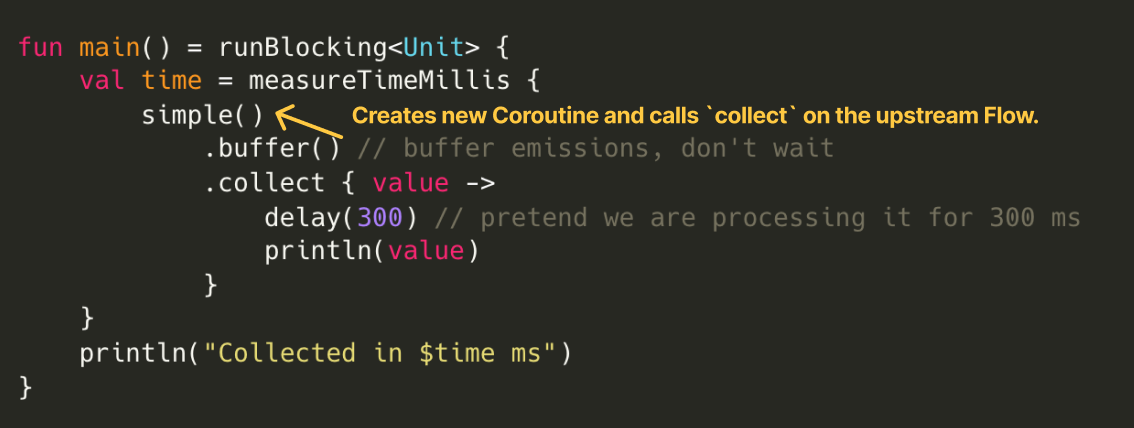 Coroutine creation and upstream
 Flow's collect call
Then, when a value is emitted from upstream to downstream, the value is queued into the Channel. As long as the buffer is not full, the sender’s emit does not suspend — so even if processing on the receiver side takes time, it does not block the pipeline.
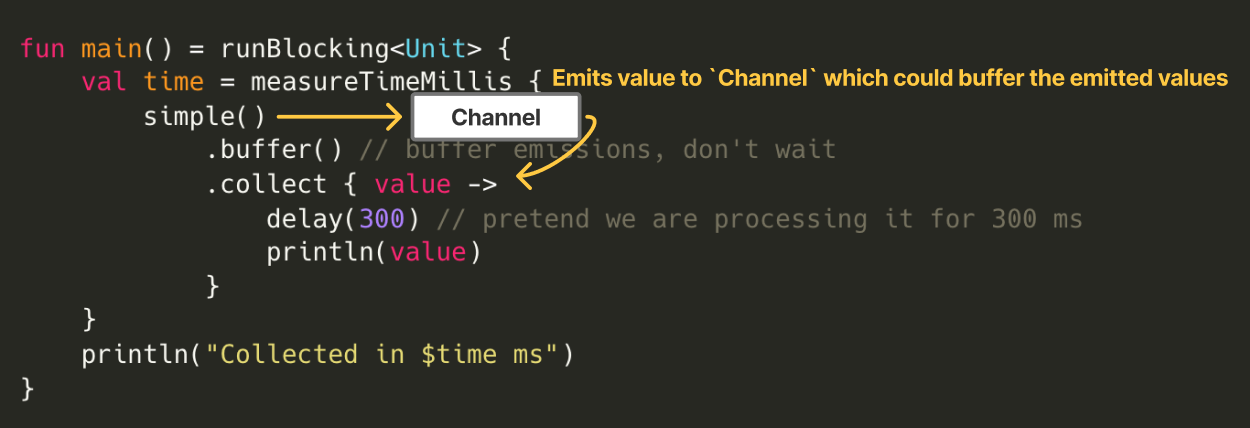 Queueing
 emitted values into the Channel
Now that we have covered the internal implementation of buffer, you should understand why, in the sample code at the beginning using buffer, the sender’s processing could proceed concurrently even while the receiver’s processing was incomplete.
Behavior and Implementation of conflate
There is a method similar to buffer called conflate. Using conflate instead of buffer as shown below, while the first value is being processed, the second and third values that arrive are conflated (merged), and only the newer third value flows through.
val time = measureTimeMillis {
    simple()
        .conflate() // conflate emissions, don't process each one
        .collect { value ->
            delay(300) // pretend we are processing it for 300 ms
            println(value)
        }
}
println("Collected in $time ms")Output:
1
3
Collected in 758 ms
The internal implementation of conflate is shown below. It simply calls the buffer method with capacity set to CONFLATED.
public fun <T> Flow<T>.conflate(): Flow<T> = buffer(CONFLATED)Reproducing the internal implementation of buffer below: when capacity is CONFLATED, the Channel is created with capacity=0 and onBufferOverflow=BufferOverflow.DROP_OLDEST. This Channel holds only the latest single value (note: the capacity is 0, but it can hold one value as mentioned earlier).
public fun <T> Flow<T>.buffer(capacity: Int = BUFFERED, onBufferOverflow: BufferOverflow = BufferOverflow.SUSPEND): Flow<T> {
    require(capacity >= 0 || capacity == BUFFERED || capacity == CONFLATED) {
        "Buffer size should be non-negative, BUFFERED, or CONFLATED, but was $capacity"
    }
    require(capacity != CONFLATED || onBufferOverflow == BufferOverflow.SUSPEND) {
        "CONFLATED capacity cannot be used with non-default onBufferOverflow"
    }
    // desugar CONFLATED capacity to (0, DROP_OLDEST)
    var capacity = capacity
    var onBufferOverflow = onBufferOverflow
    if (capacity == CONFLATED) { // 👈 HERE
        capacity = 0
        onBufferOverflow = BufferOverflow.DROP_OLDEST
    }
    // create a flow
    return when (this) {
        is FusibleFlow -> fuse(capacity = capacity, onBufferOverflow = onBufferOverflow)
        else -> ChannelFlowOperatorImpl(this, capacity = capacity, onBufferOverflow = onBufferOverflow)
    }
}
From the above, if you understand that a Channel is created internally in conflate as well, it should be easy to visualize the behavior from the underlying mechanism.
In this article, I revealed the mechanisms of Buffering and Conflation from their internal implementations. The three key points of buffer are:
- A coroutine is created when calling
collecton the upstreamFlow. - Values
emitted from upstream are received via a Channel. - The behavior of
bufferchanges depending on the Channel initialization options (conflateis one way of specifying those options).
Footnotes
-
Kotlin/kotlinx.coroutines: https://github.com/Kotlin/kotlinx.coroutines ↩ -
Buffering: https://kotlinlang.org/docs/flow.html#buffering ↩